PDF Version Demo
Paper learners are well served here. The PDF version of the Microsoft Configuring Windows 10 Devices materials prints out cleanly for easy reading, and you can share and discuss the 070-697 exam questions with friends and colleagues whenever you like. At PassExamDumps, the simplest format is often the most popular one.
Microsoft 070-697 Exam Syllabus Topics:
| Section | Weight | Objectives |
|---|---|---|
| Topic 1: Configure Networking | 10-15% | - Manage wired and wireless networks - Configure IP addressing and name resolution - Troubleshoot network connectivity - Configure network security and firewall rules |
| Topic 2: Manage Data Access and Protection | 10-15% | - Implement data loss prevention - Configure file and folder access - Implement BitLocker encryption - Configure EFS and data recovery |
| Topic 3: Plan and Implement Intune Device Management | 10-15% | - Configure compliance and configuration policies - Manage mobile application management - Integrate with Azure AD and Office 365 - Enroll devices in Intune |
| Topic 4: Plan Desktop and Device Deployment | 10-15% | - Configure Windows 10 editions and licensing - Implement provisioning and imaging - Configure Hyper-V and virtual machines - Plan installation and upgrade paths |
| Topic 5: Manage Updates and Recovery | 10-15% | - Configure Windows Update settings - Implement system restore and recovery options - Manage update deployment and patching - Troubleshoot startup and boot issues |
| Topic 6: Manage Remote Access | 10-15% | - Configure mobility settings - Implement VPN and DirectAccess - Configure Remote Desktop and Remote Assistance - Manage remote connectivity security |
| Topic 7: Configure Storage | 10-15% | - Configure file systems and permissions - Manage disks and volumes - Manage OneDrive and cloud storage - Implement Storage Spaces |
| Topic 8: Manage Apps | 10-15% | - Install and configure desktop apps - Control app access and compatibility - Manage apps from Microsoft Store - Implement app virtualization |
| Topic 9: Manage Identity | 10-15% | - Manage authentication and authorization - Configure and manage user accounts - Configure domain and Azure AD integration - Implement Microsoft Passport and biometrics |
070-697 Exam Details and Product Questions
Registration for the 070-697 exam runs through these official channels:
Given the exam's cost, book your sitting when your mock-exam results — not your calendar — say you are ready.
The 070-697 exam contains 40-60 questions with 120 minutes minutes to complete them. The PC test engine and the online test engine both let you rehearse under the same time pressure, so pacing stops being a variable on exam day.
No mandatory prerequisites; recommended: Windows desktop administration experience, basic networking knowledge, familiarity with Active Directory and Intune
Passing the 070-697 exam requires 700/1000, and registration costs $165 USD. That fee is exactly why candidates worry about wasting money on a failed attempt — and why structured preparation with verified answers is worth more than hopeful improvisation.
Same Microsoft Configuring Windows 10 Devices content, different reach. The PC test engine runs on Windows, simulates the formal exam atmosphere, and shows you where your shortcomings and strengths lie — with no limit on the number of computers you install it on. The online test engine is available only at PassExamDumps: it runs on Windows, Mac, Android, and iOS, and once loaded it works without internet, so you can practice the 070-697 exam questions on any device, at any time, anywhere. Both are built from the same daily-checked question bank.
The official outline divides the 070-697 exam into weighted domains, including:
- Manage Apps (10-15%)
- Configure Networking (10-15%)
- Plan Desktop and Device Deployment (10-15%)
The Microsoft Configuring Windows 10 Devices practice questions at PassExamDumps follow these same objectives across all three formats — PDF, PC engine, and online engine.
Work with your constraints, not against them. Short, regular sessions beat rare marathon ones: run a timed mock early to map your shortcomings, then spend your limited hours on those weak areas using the expert-verified answers to close each gap. The 070-697 exam bank is organized around the official objectives, so nothing you study is off-topic — and the online engine turns commutes and queues into usable Microsoft Configuring Windows 10 Devices practice time.
Microsoft recommends these training resources for candidates:
- Course 20697-1: Installing and Configuring Windows 10
- Course 20697-2: Managing and Maintaining Windows 10
If your schedule allows only one supplement to self-study, make it timed practice with verified answers — it converts knowledge into exam performance.
The 070-697 exam is the official assessment behind the Microsoft Configuring Windows 10 Devices certification from Microsoft. Many candidates come to it at a career plateau, looking for a credential that demonstrates verified, practical command of the published objectives. The exam rewards preparation — and preparation is the one part of the process fully under your control.
Microsoft Configuring Windows 10 Devices Sample Questions:
You administer Windows 10 Enterprise computers. Your company has a team of technical writers that is preparing technical manuals and help files. The team manager wants to ensure that the technical writers are able to restore any documents that been modified within the last year.
You need to ensure that the technical writers can restore Microsoft Word files to any previous versions for up to one year.
Which three actions should you perform in sequence?
Correct Answer:
Explanation
We need a NTFS folder.
In the Advanced settings we can configure the Keep SavedVersions settings.
Finally we turn on File History.
You are a desktop administrator for a small company and have just upgraded two laptops from Windows 8 to Windows 10 Enterprise.
When the computers were running Windows 8, Backup and Restore was active and was scheduled to back up data files two times a day to an external hard disk.
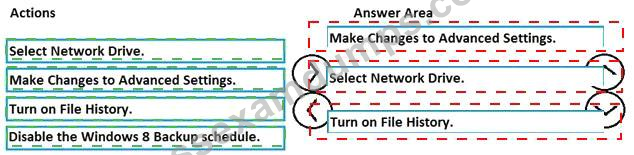
You need to enable File History so that copies of files are saved to a network drive.
Which three actions should you perform in sequence? To answer, move the appropriate three actions from the list of actions to the answer area and arrange them in the correct order.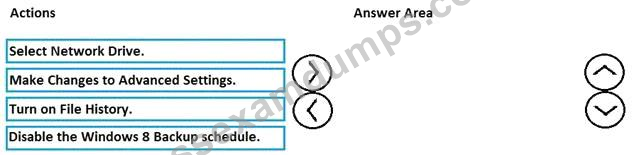
Correct Answer:
Explanation
Note: This question is part of a series of questions that use the same or similar answer choices. An answer choice may be correct for more than one question in the series. Each question is independent of the other questions in this series. Information and details provided in a question apply only to that question.
You have a computer that runs Windows 10 and is used by 10 users. The computer is joined to an Active Directory domain. All of the users are members of the Administrators group. Each user has an Active Directory account.
You have a Microsoft Word document that contains confidential information.
You need to ensure that you are the only user who can open the document.
What should you configure?
- A. Encrypting File System (EFS) settings
- B. account policies
- C. software restriction policies
- D. application control policies
- E. HomeGroup settings
- F. share permissions
- G. Microsoft OneDrive
- H. NTFS permissions
Correct Answer: A 🗳️
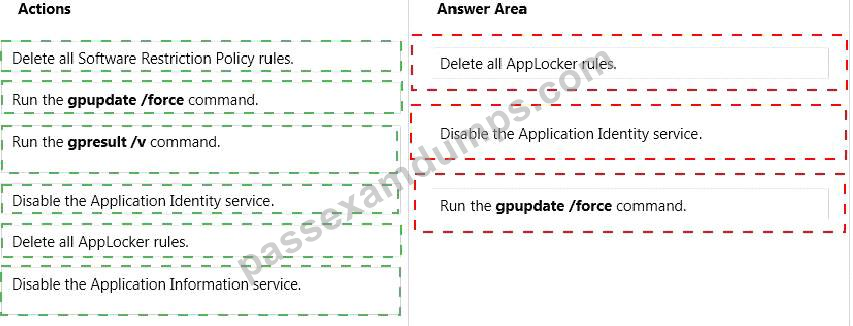
You support Windows 10 Enterprise computers. AppLocker policies are deployed.
Company policy states that AppLocker must be disabled.
You need to disable AppLocker.
Which three actions should you perform in sequence? (To answer, move the appropriate actions from the list of actions to the answer area and arrange them in the correct order.)
Correct Answer:
Explanation
Box 1: Delete all AppLocker rules.
Box 2: Disable the Application Identity service.
Box 3: Run the gpupdate /force command.
Note:
* Before you can enforce AppLocker policies, you must start the Application Identity service by using the Services snap-in console.
* The Application Identity service determines and verifies the identity of an application. Stopping this service will prevent AppLocker policies from being enforced.
The gpresult command is used to display the Resultant Set of Policy (RSoP) information for a remote user and computer. And used in conjunction with the /v parameter - it displays verbose policy information. This includes detailed settings that were applied with a precedence of 1.
References:
http://technet.microsoft.com/en-us/library/hh852337.aspx
http://technet.microsoft.com/en-us/library/cc733160.aspx
You work for a small company that recently upgraded to Windows 10 Enterprise computers.
The HR department stores sensitive data in a folder named Personnel Files.
You need to encrypt this folder only, and no other data.
What are two possible ways to achieve this goal? Each correct answer presents a complete solution.
NOTE: Each correct selection is worth one point.
- A. Use cipher.exe.
- B. Use RFFS.
- C. Use EFS.
- D. Use BitLocker
Correct Answer: A,C 🗳️
Viewing page 1 out of 68 pages.
Viewing questions 1-5 out of 340 questions.


 Rosemary

 Quentin
 Odelette

 Jeff
 Stacey
 Andrew
 Basil
 Jeff
 Olivia
 Antoine

 Horace
 Virgil
 Roy